Filter by country, state, city, ZIP code, or autonomous system number (ASN). An ASN identifies a network, and available matches depend on the residential pool.
Official PreProx Windows app
PreProx Proxy Manager for Windows
Target residential proxies by country, state, city, ZIP code, or ASN. Connect to your mobile and WiFi leases or add your own proxy profile, then check the exit IP from your Windows PC.
Reviewed November 15, 2026
Official PreProx product page
Version 1.0.2
Installer
Windows .exe
Residential filters
Location, ZIP code, and ASN
Protocols
SOCKS5, HTTP, HTTPS
Connection mode
Windows system proxy
What it does
Manage your proxy connections from one Windows app.
Use the Residential workspace to narrow your IP search, open Mobile & WiFi for active leases, or save your own endpoint in Manual Mode. Sign in with your PreProx account to see the residential data and leases you already have.
Save a targeting combination or favorite a residential entry to return to it later.
Use sticky mode or set a rotation interval from 1 to 120 minutes. A sticky IP can change if its peer goes offline or you change targeting.
View eligible active leases and connect or copy credentials from the Mobile & WiFi workspace.
Save an authorized SOCKS5, HTTP, or HTTPS endpoint with its host, port, and optional authentication.
Check a residential exit IP or open Proxy Quality Checker to review the connection and the exit network.
Connection sources
Choose a proxy source.
Use one active connection at a time. Disconnect the current proxy before switching to another profile or location.
Pay-as-you-go data
Residential proxies
Use your PreProx residential data. Combine location and ASN filters where the selected network supports them, then connect or copy proxy credentials.
- Country, state, city, ZIP code, and ASN filters
- Sticky sessions and timed rotation
- Usage history and remaining data
Active leases
Mobile and WiFi static proxies
Open Mobile & WiFi to find your active leases. Connect directly or view and copy the credentials.
- Synced lease credentials
- Connection and lease details
Bring your own endpoint
Manual proxies
Sign in and add a proxy server you are authorized to use. Save its connection details so you can reuse the profile.
- HTTP, HTTPS, and SOCKS5 profiles
- Optional username and password
Product interface
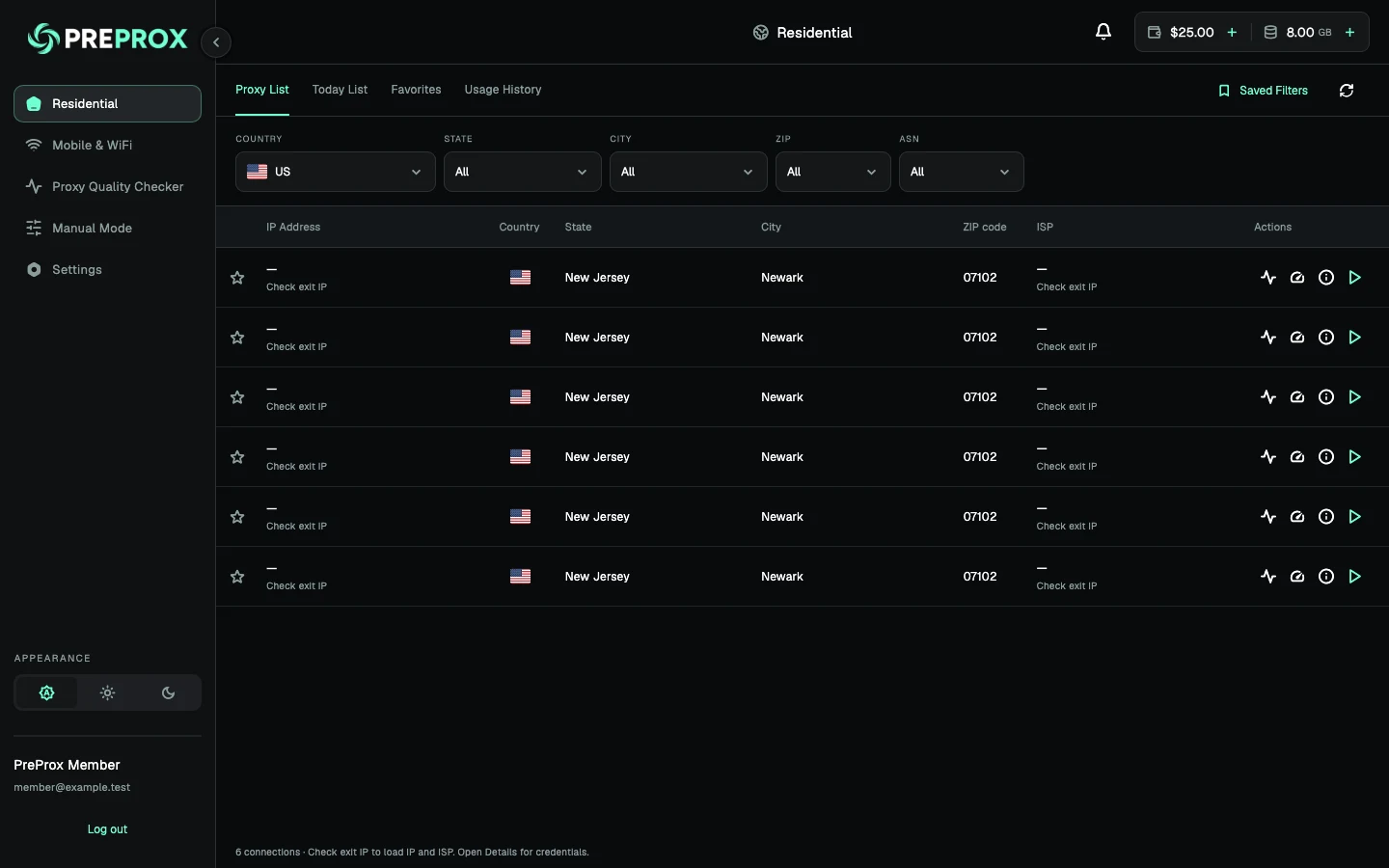
Filter residential proxies by location and network.
Start with a country, then narrow the list by state, city, ZIP code, or ASN. When you find a match, check its exit IP, view the credentials, or connect from the same row.
- Save filters for repeat work
- Review recent sessions in Usage History
- Use browsers and apps that follow Windows system proxy settings
Setup guide
Install and connect on Windows.
Download the official .exe installer, sign in, then verify the route in the browser or app you plan to use.
01
Download the Windows installer
Download the published .exe from this page and follow the installation prompts.
02
Sign in to PreProx
Open PreProx Manager and sign in. Complete any Security PIN or new-device verification requested for your account.
03
Choose a proxy
Filter residential proxies by location or ASN, select an active Mobile & WiFi lease, or add an endpoint in Manual Mode.
04
Connect and check the exit IP
Connect from the selected proxy row or profile. Check the public IP in your intended browser or app to confirm it follows the Windows system proxy.
Compatibility and limits
Know what is required before installing.
These details describe the current product and distinguish the connection manager from the proxy access used with it.
- Device
- A 64-bit Windows PC with the x64 or ARM64 build included in the installer
- Account
- A PreProx account is required to sign in
- Proxy access
- Residential data and static leases are purchased separately. Manual Mode accepts compatible endpoints you are authorized to use
- Connection scope
- Windows apps and browsers that honor the system proxy can use the selected route
Products and verification
Find proxy access and check your connection.
Compare PreProx proxy products or confirm the public IP after connecting.
Other PreProx tools
Choose the tool that matches your device.
Each product has its own official installation page, requirements, and setup guidance.
Common Questions
Installation, compatibility, proxy access, and account requirements explained directly.
How do I download PreProx Proxy Manager for Windows?
Use the download button on this page to get the latest published Windows .exe installer. Run it and follow the installation prompts.
Does the app include every Residential Data dashboard feature?
Available controls depend on the eligible product and installed app version. Windows supports location, ZIP code, and ASN targeting, sticky sessions, and timed rotation from 1 to 120 whole minutes. Use Residential Data in the web dashboard to manage residential purchases and account settings.
Can I target a ZIP code or ASN in the Windows app?
Yes. Open Residential and select the ZIP or ASN filter. ZIP codes narrow the location and an ASN narrows the network. Results depend on the available residential IPs for that combination.
Which Windows apps use the proxy?
Browsers and apps that follow Windows system proxy settings can use the active route. Software with its own networking or proxy settings can connect separately.
Do I need a PreProx account or a paid plan?
Sign in with a PreProx account to open the app. Residential data and static leases are sold separately. You can add your own compatible endpoint in Manual Mode without purchasing PreProx proxy access.
Can I use SOCKS5 and HTTP proxies on Windows?
Yes. PreProx Manager supports SOCKS5, HTTP, and HTTPS proxy profiles. Enter the host, port, and any authentication your endpoint requires.
What happens to Windows proxy settings when I disconnect?
PreProx restores the Windows proxy settings it saved for your user when the connection began. The app reports a failure if it cannot restore them.
Does the Windows app support rotating and sticky residential IPs?
Yes. Use a timed rotation interval or choose Sticky to keep the same exit IP while the peer stays available and targeting stays the same.
Official download
Install PreProx Manager for Windows from the official source.
Use the verified destination below and review the current permissions or installation prompt before continuing.