A proxy server is an intermediary between your device, browser, app, or automation tool and a destination on the internet. It receives a request, forwards it to the destination, and returns the response. That middle layer can help with IP routing, access control, caching, filtering, and location-aware testing.
A proxy server is an intermediary that receives your request, forwards it to a website or app, and returns the response. The destination usually sees the proxy's IP address instead of your direct connection.
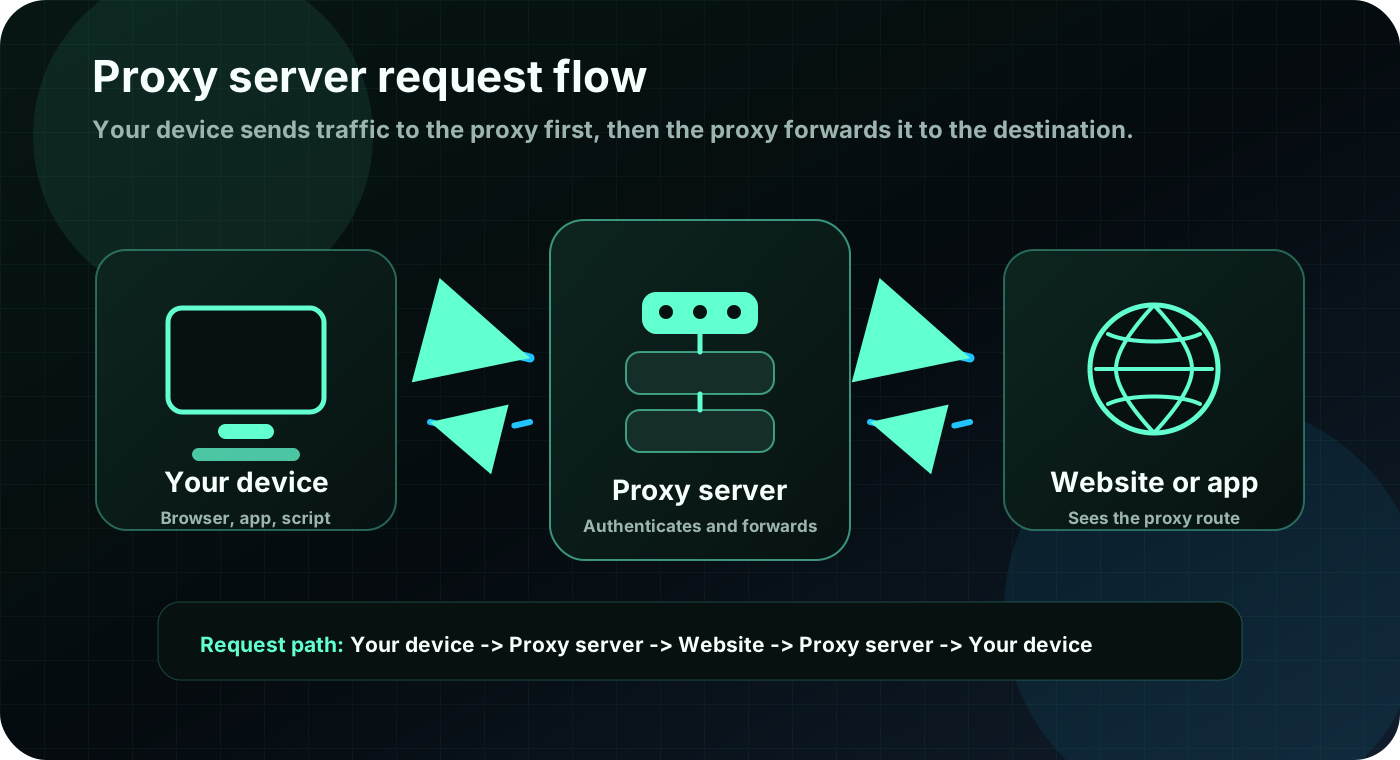
- Your device connects to the proxy first.
- The proxy sends the request onward to the destination.
- The destination responds to the proxy, and the proxy relays that response back to you.
How a proxy request flows
Your device
A browser, app, script, or operating system sends traffic to a configured proxy endpoint.
Proxy server
The proxy authenticates, forwards, filters, caches, or routes the request depending on how it is configured.
Website or app
The destination receives the request from the proxy route and sends the response back through the same path.
Proxy types at a glance
The word proxy describes the middle layer. The right proxy type depends on the network source, protocol, session behavior, and job you need to run.
| Proxy type | What it means | Best fit |
|---|---|---|
| Forward proxy | Represents the client and forwards outbound requests to the internet. | Browser routing, app testing, public web requests, and policy controls. |
| Reverse proxy | Represents a server and receives inbound requests before they reach backend infrastructure. | Load balancing, origin protection, caching, and application delivery. |
| HTTP or HTTPS proxy | Handles web traffic and is commonly supported by browsers, API clients, and scraping tools. | Web requests, API checks, and tools with native HTTP proxy fields. |
| SOCKS5 proxy | Relays lower-level TCP traffic for software that supports SOCKS5 directly. | Apps that need a general TCP proxy instead of only HTTP/S handling. |
| Residential proxy | Routes through IP space associated with residential internet service providers. | Location-aware research, public data checks, localized testing, and ISP context. |
| Datacenter proxy | Routes through hosting or cloud networks with more predictable infrastructure. | Speed-focused workflows, stable infrastructure, and cost-sensitive testing. |
| Mobile proxy | Routes through cellular carrier network infrastructure. | Mobile-network checks, carrier context, and mobile app testing workflows. |
Proxy server vs VPN
A proxy and a VPN both add an intermediary, but they usually protect different scopes of traffic.
| Question | Proxy server | VPN |
|---|---|---|
| Traffic scope | Often configured per browser, app, script, or endpoint. | Usually routes all device traffic through a VPN tunnel. |
| Encryption | Not automatically encrypted unless the protocol or application adds encryption. | Typically encrypts traffic between the device and VPN server. |
| Common use | Request routing, location testing, automation workflows, caching, and filtering. | Device privacy, secure network access, and broader traffic protection. |
| Best choice | Choose a proxy when a specific app or workflow needs route, IP, protocol, or session control. | Choose a VPN when the whole device needs encrypted network transport. |
Choose the proxy by the job
Residential proxies
Use residential networks when location, ISP context, or a diverse IP pool matters more than pure infrastructure speed.
Static lease proxies
Use a leased proxy when you need one route for a defined window, such as a 24-hour testing or account-management session.
HTTP/S or SOCKS5
Match the protocol to your software. Many web tools support HTTP/S, while some apps require SOCKS5.
What does a proxy server do?
A proxy server acts on behalf of another device or server. In a common forward-proxy setup, your browser or app sends traffic to the proxy first. The proxy then contacts the destination and returns the response to your device.
Because the proxy sits in the middle, it can change the visible network path. Depending on the setup, it may hide the direct client IP from the destination, enforce access rules, cache repeated requests, route traffic through a selected location, or log traffic for troubleshooting.
How does a proxy server work?
A typical proxy request has four steps. First, your software opens a connection to the proxy endpoint. Second, the proxy checks authentication or access rules. Third, it forwards the request to the destination. Fourth, the destination response travels back through the proxy to your software.
This separation lets a workflow use a different exit route, location, protocol, or session behavior without changing the destination website. It does not automatically make a request safe, anonymous, or permitted, so destination terms and provider acceptable-use rules still matter.
Proxy server example
Imagine you need to check how a public web page appears from another city. Instead of sending the request directly from your home or office connection, your browser or script sends it to a proxy endpoint. The proxy forwards the request from the selected network route, and the website responds to that proxy path.
Another example is a company network that uses a proxy to filter requests, cache common resources, or apply policy before employee traffic reaches the open internet. In both cases, the proxy creates a managed middle step between the client and destination.
Forward proxy vs reverse proxy
A forward proxy represents the client. It sits between users, devices, apps, or scripts and the public internet. When most people say proxy server, they usually mean a forward proxy.
A reverse proxy represents the server. It sits in front of websites, APIs, or backend applications and receives inbound traffic before it reaches the origin. Reverse proxies are commonly used for load balancing, caching, TLS handling, and origin protection.
HTTP, HTTPS, SOCKS5, residential, datacenter, and mobile proxies
HTTP and HTTPS proxies are common for web requests because browsers, API clients, command-line tools, and scraping frameworks often support them directly. SOCKS5 works at a lower level and can relay TCP traffic for software that supports SOCKS5 configuration.
Residential, datacenter, and mobile describe the network source. Residential proxies use IP space associated with home ISPs, datacenter proxies use hosting or cloud networks, and mobile proxies use carrier networks. Rotating and sticky describe session behavior, while shared and private describe who can use the route.
Are proxy servers safe?
A proxy can be safe when it is operated by a trustworthy provider, configured correctly, and used for authorized work. A proxy can also be risky if it logs sensitive traffic, injects content, exposes DNS or WebRTC leaks, or routes credentials through an unknown service.
Do not assume a proxy encrypts everything. For sensitive accounts or private browsing, confirm the protocol, application settings, DNS behavior, provider policy, and whether a VPN or another security layer is more appropriate.
When should you use a proxy?
A proxy is useful when a specific workflow needs route control, location context, session behavior, or protocol compatibility. Common authorized uses include localized quality checks, public-data research that follows site rules, ad verification, SEO testing, browser automation, API testing, and checking how your own sites behave from another network.
Start with the workflow, not the label. Decide whether you need country, state, city, ZIP, ISP, rotation, sticky sessions, HTTP/S, SOCKS5, shared access, private access, or a fixed lease window before choosing a product.
Common proxy mistakes
The most common mistake is choosing a proxy type before defining the job. A fast datacenter proxy may be wrong for a location-sensitive test, while a residential proxy may be unnecessary for a simple infrastructure check.
Other mistakes include using the wrong protocol, ignoring DNS behavior, sending too much traffic too quickly, assuming a proxy guarantees anonymity, and skipping a small test before scaling. Always use proxies for lawful, authorized tasks and follow the destination website rules.
Common questions about proxy servers
Is a proxy server the same as a VPN?
No. A proxy usually routes traffic for a specific app, browser, script, or endpoint. A VPN usually routes and encrypts traffic for the whole device through a VPN tunnel.
Does a proxy hide my IP address?
A proxy can hide your direct IP address from the destination website by sending the request through the proxy route. It does not guarantee full anonymity, and leaks or logs can still expose information.
What is an example of a proxy server?
A browser configured to use an HTTP proxy is a simple example. The browser sends web requests to the proxy, the proxy forwards them to websites, and responses come back through the proxy.
Should proxy settings be on or off?
Keep proxy settings off unless you intentionally need a proxy for a trusted app, work network, testing workflow, or provider endpoint. Incorrect proxy settings can break browsing or route traffic somewhere unexpected.
Are free proxy servers safe?
Free proxies can be risky because the operator may log traffic, inject ads, fail often, or expose sensitive data. Use trusted providers and avoid sending private credentials through unknown proxy servers.